
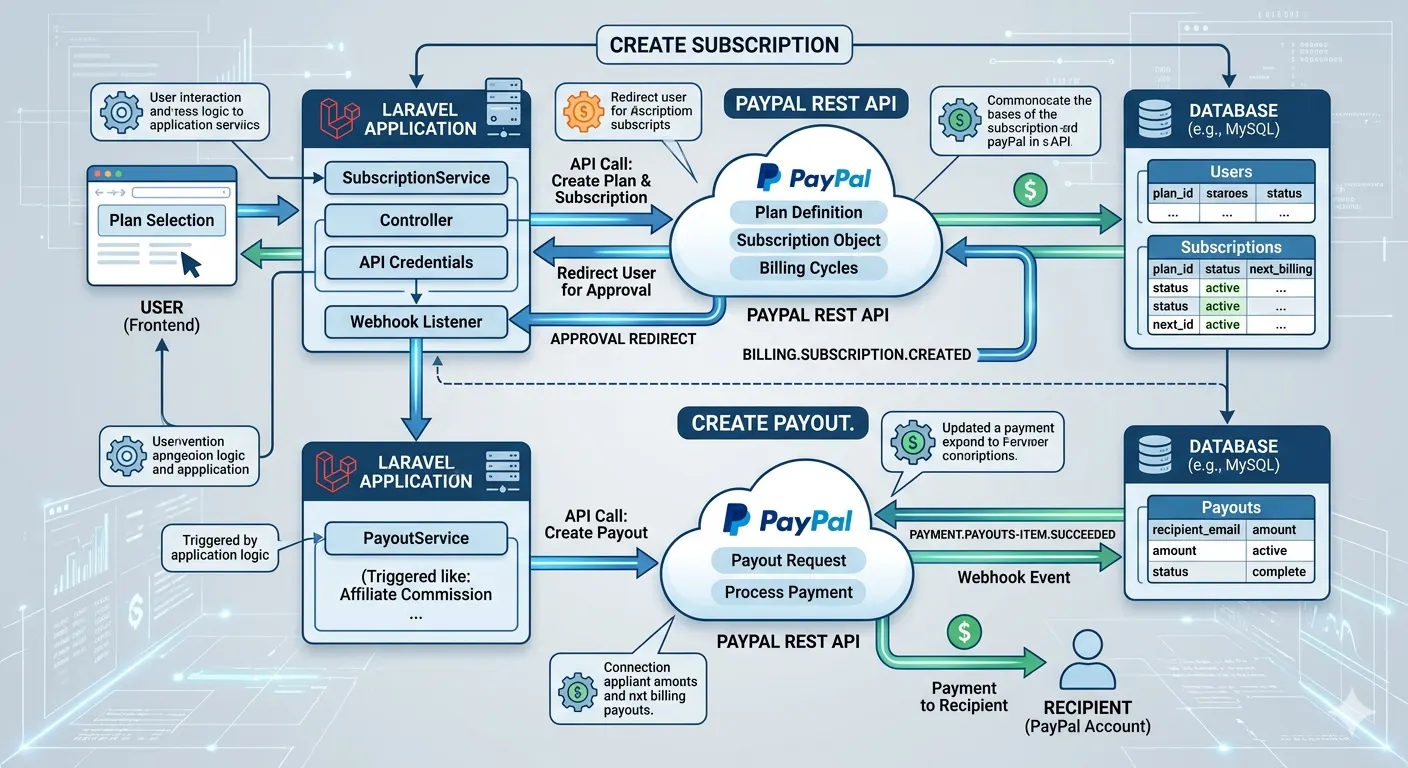
In this tutorial, we’ll go over three popular PayPal integrations in Laravel:
- One-Time Payments
- Recurring Subscription Payments
- Payouts to Vendors or Users
The purpose of this blog is to give you a practical understanding of how everything works together in a real Laravel application.
Why Use PayPal in Laravel?
Laravel provides a clean structure for APIs, authentication, queues, webhooks and payment workflows. When integrated, building scalable payment systems with PayPal APIs is very simple
Common Use Cases:
- SaaS subscription billing
- Marketplace seller payouts
- Membership platforms
- Donation systems
- One-time checkout payments
Step 1: Create a PayPal Developer Account
Before writing any code, you need access to PayPal Developer APIs.
- Create a PayPal Developer account
- Create a Sandbox App
- Get your Client ID and Secret Key
- Use Sandbox mode for testing
Sandbox allows you to test payments without using real money.
Step 2: Installing the PayPal Package in Laravel
One of the easiest ways to integrate PayPal is to use the official PayPal Checkout SDK.
composer require paypal/paypal-server-sdkYou can also use direct API integration if you prefer full control.
Step 3: Configure PayPal Credentials
Add your PayPal credentials inside the .env file.
PAYPAL_MODE=sandbox
PAYPAL_CLIENT_ID=your_client_id
PAYPAL_CLIENT_SECRET=your_secret_key
Then create a PayPal config file inside config/paypal.php.
return [

    'mode' => env('PAYPAL_MODE', 'sandbox'),

    'sandbox' => [
        'client_id' => env('PAYPAL_CLIENT_ID'),
        'client_secret' => env('PAYPAL_CLIENT_SECRET'),
    ],
];
One-Time Payment Integration
One-time payments are useful when customers purchase a product or pay for a single service.
Create Payment Route
Route::post('/paypal/payment', [PayPalController::class, 'createPayment']);
Route::get('/paypal/success', [PayPalController::class, 'success']);
Route::get('/paypal/cancel', [PayPalController::class, 'cancel']);
Create Payment Controller
public function createPayment(Request $request)
{
    $response = Http::withBasicAuth(
        env('PAYPAL_CLIENT_ID'),
        env('PAYPAL_CLIENT_SECRET')
    )->post('https://api-m.sandbox.paypal.com/v2/checkout/orders', [

        "intent" => "CAPTURE",

        "purchase_units" => [
            [
                "amount" => [
                    "currency_code" => "USD",
                    "value" => "50.00"
                ]
            ]
        ]
    ]);

    return $response->json();
}
PayPal will return an approval URL after the order is created where the customer will complete the payment.
Subscription Integration in Laravel
Recurring subscriptions are commonly used in SaaS applications, gyms, memberships, and streaming platforms.
How PayPal Subscription Flow Works
| Step | Description |
|---|---|
| 1 | Create Product |
| 2 | Create Billing Plan |
| 3 | Create Subscription |
| 4 | User Approves Subscription |
| 5 | Webhook Updates Subscription Status |
Create Subscription Plan
$response = Http::withToken($accessToken)
    ->post('https://api-m.sandbox.paypal.com/v1/billing/plans', [

    "product_id" => "YOUR_PRODUCT_ID",

    "name" => "Premium Plan",

    "billing_cycles" => [
        [
            "frequency" => [
                "interval_unit" => "MONTH",
                "interval_count" => 1
            ],

            "tenure_type" => "REGULAR",

            "sequence" => 1,

            "total_cycles" => 0,

            "pricing_scheme" => [
                "fixed_price" => [
                    "value" => "19.99",
                    "currency_code" => "USD"
                ]
            ]
        ]
    ],

    "payment_preferences" => [
        "auto_bill_outstanding" => true
    ]
]);
Create Subscription
$response = Http::withToken($accessToken)
    ->post('https://api-m.sandbox.paypal.com/v1/billing/subscriptions', [

    "plan_id" => "YOUR_PLAN_ID",

    "application_context" => [
        "brand_name" => "Your Brand",
        "return_url" => route('paypal.success'),
        "cancel_url" => route('paypal.cancel')
    ]
]);
PayPal will return an approval URL where the user can activate the subscription.
PayPal Webhooks in Laravel
Webhooks are extremely important because they notify your Laravel application whenever:
- A payment succeeds
- A subscription renews
- A payment fails
- A subscription gets cancelled
Create Webhook Route
Route::post('/paypal/webhook', [WebhookController::class, 'handle']);Webhook Example
public function handle(Request $request)
{
    $payload = $request->all();

    if($payload['event_type'] == 'PAYMENT.SALE.COMPLETED')
    {
        // Update payment status
    }

    if($payload['event_type'] == 'BILLING.SUBSCRIPTION.ACTIVATED')
    {
        // Activate subscription
    }

    return response()->json([
        'status' => true
    ]);
}
PayPal Payouts Integration
PayPal Payouts are useful when you want to send money to users, freelancers, vendors, or sellers directly from your platform.
Example Use Cases:
- Marketplace seller settlements
- Affiliate commissions
- Freelancer payments
- Referral rewards
Create Payout Request
$response = Http::withToken($accessToken)
    ->post('https://api-m.sandbox.paypal.com/v1/payments/payouts', [

    "sender_batch_header" => [
        "sender_batch_id" => uniqid(),
        "email_subject" => "You have received a payout!"
    ],

    "items" => [
        [
            "recipient_type" => "EMAIL",
            "amount" => [
                "value" => "25.00",
                "currency" => "USD"
            ],
            "receiver" => "seller@example.com",
            "note" => "Thanks for working with us",
            "sender_item_id" => uniqid()
        ]
    ]
]);
Once processed successfully, PayPal sends the amount directly to the recipient’s PayPal account.
Important Things to Consider
- Always use webhooks for payment confirmation
- Never trust frontend payment success alone
- Store PayPal transaction IDs in your database
- Use queues for handling payout processing
- Enable proper logging for failed payments
Sandbox vs Live Mode
| Sandbox | Live |
|---|---|
| Testing environment | Real transactions |
| Fake money | Real money |
| Safe for development | Production environment |
Final Thoughts
Integrating PayPal in Laravel is not just about accepting payments. Modern applications usually require:
- One-time checkout payments
- Recurring subscriptions
- Automated payouts
- Webhook handling
- Secure transaction tracking
If your application includes memberships, marketplaces, vendor systems, or SaaS billing, PayPal can be a reliable solution alongside Laravel.
The most important part is structuring the payment flow correctly and handling webhooks properly. Once that foundation is in place, scaling the payment system becomes much easier.